Best Free AI Tools to Make Short Videos in 2026 (Reels, TikTok, Shorts)
 Falah Hassan
•
•
Came from video #3? You're in the right place. See all video guides →
You no longer need a camera, an editor or a budget to post Reels, TikToks and YouTube Shorts. In 2026, free AI tools can write the visuals, speak the voiceover, cut long videos into clips and add captions automatically. The catch is that every free plan holds something back: a watermark, a monthly limit or lower resolution.
This guide lists the best free AI tools for short videos, what each one is really good at, the exact free-plan limits, and a simple workflow that combines them into a finished video without paying anything.
1. CapCut: the best free editor with AI captions
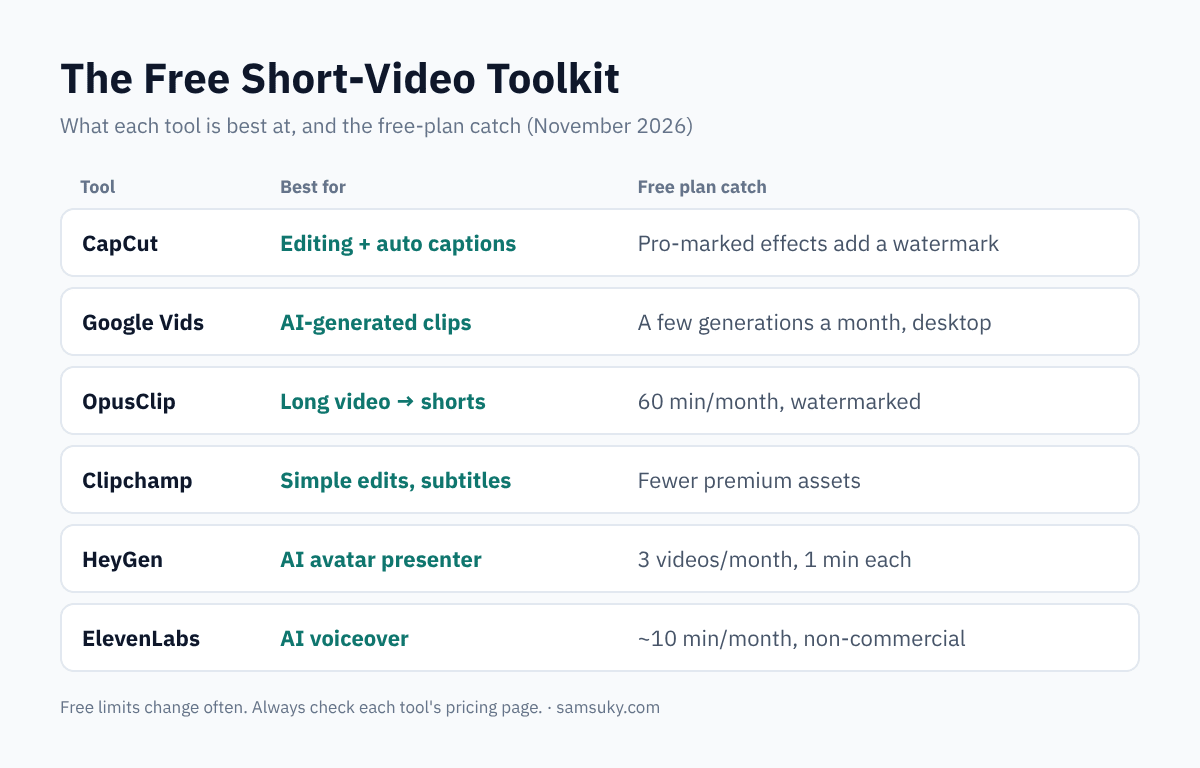
CapCut is the go-to editor for short-form video, on phone, desktop and web. The free plan gives you the full timeline, auto-captions in many languages, background removal and 1080p export. Most standard edits export without a watermark. The watermark appears only when your project uses templates or effects marked Pro, so check for the Pro badge before exporting.
Use it for: cutting clips, adding captions, music, transitions and text.
2. Google Vids: free AI-generated video clips
Google Vids now lets anyone with a personal Google account generate AI video clips for free. Open vids.new on a desktop browser and choose the option to create AI videos. It produces 1080p clips from text, images or existing footage. The free allowance is small, around six generations a month for personal accounts, so plan your prompts carefully.
Use it for: B-roll and visual scenes you can't film yourself.
Note: OpenAI shut down the consumer Sora app in April 2026, so it's no longer an option for free video generation.
3. OpusClip: turn long videos into shorts
If you already have a podcast, livestream or long YouTube video, OpusClip finds the best moments and turns them into captioned vertical clips. The free-forever plan includes 60 processing minutes per month (one credit per minute of source video). Free exports are watermarked and you must download them within 3 days. New accounts also start with a short Pro trial.
Use it for: repurposing long content into many short clips.
4. Clipchamp: simple edits without a watermark
Microsoft's Clipchamp runs in the browser and on Windows. Its free plan exports in 1080p with no watermark and includes AI tools such as automatic subtitles and silence removal. It has fewer trendy effects than CapCut, but it's clean, simple and great for beginners.
Use it for: quick, tidy edits and captions on a computer.
5. HeyGen: an AI presenter without showing your face
Want a talking presenter but don't want to be on camera? HeyGen creates videos with AI avatars that read your script. The free plan gives you 3 videos a month, up to 1 minute each, which fits short-form perfectly.
Use it for: faceless explainers, product demos and tips.
6. ElevenLabs: realistic AI voiceovers
A good voice makes a short video feel professional. ElevenLabs turns your script into natural speech in many languages and accents, Its free plan gives you 10,000 credits a month, roughly 10 minutes of speech, enough for many short scripts. The catch: free-plan audio is for non-commercial use with attribution only. For monetized videos you need a paid plan.
Use it for: narration for faceless channels.
Bonus: free AI generators with small daily credits
Tools like Kling, Pika, Luma and Runway offer free credits for short AI clips. They're fun for experiments, but free outputs are usually capped at around 720p (Pika even lower) and often carry a watermark, so treat them as extras rather than your main workflow.
A $0 Workflow for One Short Video
- Script: write a 60–80 word script with a strong first line. Any free AI chatbot can help you brainstorm hooks.
- Voice: generate the narration in ElevenLabs (or record your own voice).
- Visuals: create 2–4 clips in Google Vids, or use an avatar from HeyGen.
- Edit: put it together in CapCut or Clipchamp, add auto-captions and background music.
- Repurpose: if you make long videos, run them through OpusClip for extra shorts.
- Post: publish the same vertical video to TikTok, Instagram Reels and YouTube Shorts.
Tips to Make Free AI Videos Perform
- Hook in the first 2 seconds: a question, a bold number or a surprising visual.
- Keep it under 30–45 seconds for most topics.
- Always add captions; many people watch with the sound off.
- Avoid watermarks from free tools on your main channel. They can reduce reach.
- Check each tool's license before using its output in monetized content.
FAQ
Can I make money with videos made by free AI tools? Often yes, but every tool has its own terms. Some free plans restrict commercial use or require attribution, so read the license first.
Which single free tool should I start with? CapCut. It covers editing and captions, and you can add the others later.
Do platforms penalize AI videos? Not by default, but TikTok, Instagram and YouTube ask you to label realistic AI-generated content. Original, useful videos still win.
Useful Links
Free plans checked in November 2026. AI tools change their limits often, so confirm on each pricing page before you rely on them.

كاتب في Samsuky
تعليقات
إرسال تعليق